
Call us
Monday to Thursday: 9am to 5pm
Friday: 9am to 3:30pm

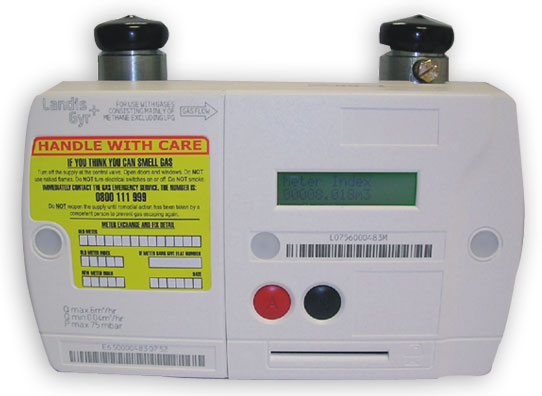
Press the red ‘A’ button
| Errror Message | Description | Resolution |
| M----- (Libra 200) M***** (Libra 210) | Meter has been decommissioned | Please contact via email customeroperations@firmusenergy.co.uk or call us on freephone 0330 024 9000 and we will place a call with Phoenix Natural Gas, your network provider. They will then dispatch their Engineer. |
| Fault Call Help | Module has failed | Please contact via email customeroperations@firmusenergy.co.uk or call us on freephone 0330 024 9000 and we will place a call with Phoenix Natural Gas, your network provider. They will then dispatch their Engineer. |
| £ 0.00 Off Call Help | Module has detected a fault | Please contact via email customeroperations@firmusenergy.co.uk or call us on freephone 0330 024 9000 and we will place a call with Phoenix Natural Gas, your network provider. They will then dispatch their Engineer. *This fault commonly occurs when gas users run out of credit. It is advised to keep credit on your meter. |
Step 1
Are you inserting the PAYG card with gold chip facing up?
Step 2 Please clean the gold chip on the PAYG card with a soft cloth or eraser
Step 3 Do you have a second PAYG card?
Does it work with the meter?
Step 4 Does the meter still allow gas to flow ( i.e. are your gas appliances still working)?
Step 5 How much credit do you have on your meter?
Have you used the PAYG card with this meter without issue before?
Step 2 Please clean the gold chip on the PAYG card with a soft cloth or eraser
Step 3 Do you have a second PAYG card?
Does it work with the meter?
Step 4 Does the meter still allow gas to flow ( i.e. are your gas appliances still working)?
Step 5 How much credit do you have on your meter?
Monday to Thursday: 9am to 5pm
Friday: 9am to 3:30pm
Get quick answers from our support team online.
Check out the popular questions.
