
Call us
Monday to Thursday: 9am to 5pm
Friday: 9am to 3:30pm

If you have a credit meter, submitting your own reads is the best way to keep your bills accurate and avoid estimates.
We'll read your meter once a year. If we can't get access, we'll contact you to arrange an appointment. Please help us by keeping your meter accessible when we call.
How to submit your reading
You can send us your reading by:
Submit your reading within the timeframe we give you. If we don't receive it in time, or we can't access your meter, you'll receive an estimated bill.
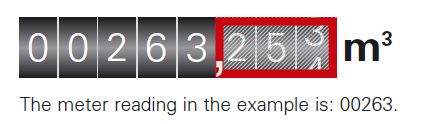
It's simple. Read the digits from left to right, ignoring any digits in the red box or after the comma. Your meter tells us how much gas you've used, so we can bill you accurately.
If you'd like to manage your account online, call our customer service team on 0330 024 9000 and we'll help you set up access to the Customer Portal.
If you have a pay-as-you-go meter, you don't need to submit a reading. We'll read your meter once a year, and if we can't get access, we'll contact you to arrange an appointment.
Any questions about your meter read? Email customeroperations@firmusenergy.co.uk with your full address details, or call us on 0330 024 9000.
If you're a domestic customer and your meter is outside, our meter readers will continue to call as normal. For commercial premises, our readers will carry on reading meters inside and will always ask permission before entering.
*Customers with a pay-as-you-go meter do not need to read their meter or submit a meter reading. This is for customers with a credit meter only.
Monday to Thursday: 9am to 5pm
Friday: 9am to 3:30pm
Get quick answers from our support team online.
Check out the popular questions.
